Certificates
Certificate features allow organizers to configure certificate settings and let eligible attendees access their certificates.
Admin Responsibilities
- Enable or disable certificates for the event.
- Configure certificate settings for an event.
- Adjust certificate design layout and category-specific overrides when needed.
- Review certificate records.
- Approve, revoke, regenerate, or update certificates when needed.
- Support attendees who cannot access or verify certificates.
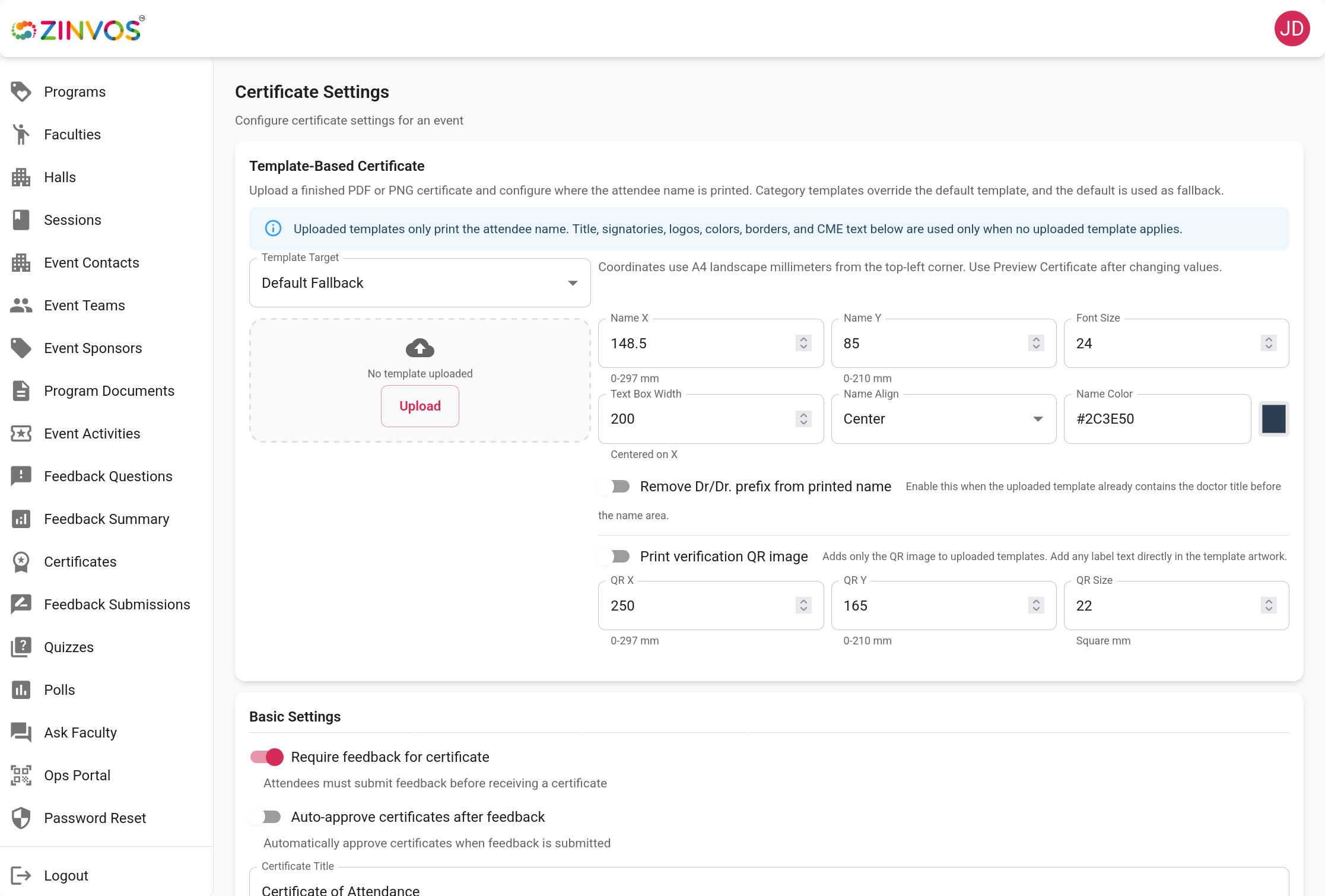
Settings
Certificate settings can include enablement, logos, signatures, template text, category-specific rules, CME hours (continuing-education credit hours, such as CME or CPD, for events that award them), and feedback requirements. Review the preview before certificates are issued.
Use the event enablement control to decide whether certificates should be available for the event. Keep certificates disabled until the design, eligibility rules, signatories, and feedback requirements are ready.
Auto-Email Certificates
You can enable auto-email so approved certificate PDFs are sent automatically to registered and checked-in participants. The background sender runs periodically and emails participants when certificates become eligible and approved.
Auto-email behavior:
- Emails are sent only for approved certificates.
- If feedback is required, emails are sent only after the participant submits feedback.
- Auto-approve should be enabled for fully automatic delivery.
- If auto-approve is disabled, manually approve certificates before the background sender emails them.
- Review the certificate list to check email delivery status when needed.
Design Builder
The design builder supports visual layout adjustments for certificate content. Admins can position certificate elements, review the preview, and save event-specific design settings.
Before issuing certificates, confirm:
- The participant name, event name, category, CME hours, and certificate number are readable.
- Logos and signatures are aligned and not cropped.
- The design works for the expected certificate categories.
- Regeneration is planned if the design changes after certificates have already been issued.
Category Overrides
Some events issue different certificates for different attendee categories. Category-specific overrides let admins adjust certificate text, layout, or settings for a category without changing the event's default certificate design.
Use category overrides when groups such as delegates, faculty, speakers, committees, or sponsors need different wording or layout.
Certificate List
Use the certificate list to review participant certificate status and take action.
Common actions:
- Approve certificates.
- Bulk approve eligible participants.
- Revoke a certificate.
- Regenerate a certificate after settings change.
- Assign or adjust CME hours.
- Review linked feedback responses when certificates depend on feedback.
Feedback Requirement
If feedback is required, attendees may see a certificate eligibility banner in the mobile app. The banner can guide them to feedback before they can access the certificate.
Support Notes
When helping an attendee, confirm the event, participant registration, attendee category, attendance or eligibility rule, feedback completion, certificate enablement, approval status, and certificate identifier if available.